Certificate formats · 19.7
Chain options
Three options control which certificates of the chain TLSPilot writes and in which order. They exist in the dialog Export certificate, in the deployment targets File Path (WinRM), UNC share and File Path (SSH), in the WebUI and in PowerShell (chapter Export a certificate).
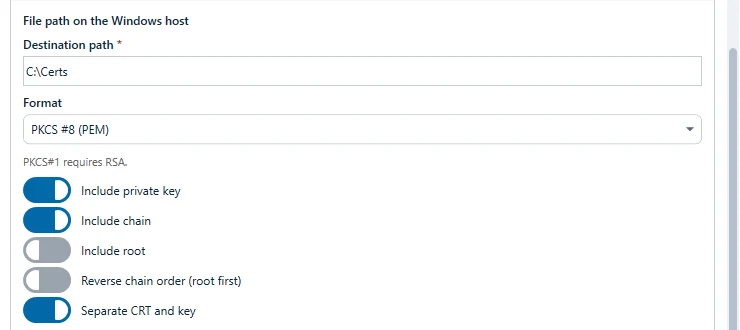
- Include chain (on by default): writes the leaf and the intermediates. Off: only the leaf. When you switch it off, TLSPilot also switches off the two following options.
- Include root (off by default, only with Include chain): adds the root certificate at the end. If the root is not in the chain that TLSPilot received from the CA, TLSPilot looks for it in the local certificate stores of the management host only: Trusted Root Certification Authorities and Intermediate Certification Authorities, each of the computer and of the current user. It only accepts a self-signed certificate whose name and key identifier match the issuer of the top certificate in the chain. TLSPilot does not download the root and does not look on the target. If it does not find the root, it writes the file without the root and warns: The root certificate was not in the stored chain and was not found on this management host. The file was written without the root.
- Reverse chain order (root first) (off by default, only with Include chain): writes the chain in the opposite order, root first. Use it only if the documentation of the receiving software explicitly requires this order. It has no effect on a PFX.
| Include chain | Include root | Reverse | PEM certificate file | PFX |
|---|---|---|---|---|
| Off | – | – | Leaf | Leaf |
| On | Off | Off | Leaf, intermediates (as received from the CA) | Leaf, intermediates |
| On | On | Off | Leaf, intermediates, root | Leaf, intermediates, root |
| On | Off | On | Intermediates (reversed), leaf | Leaf, intermediates |
| On | On | On | Root, intermediates, leaf | Leaf, intermediates, root |
In a File Path deployment, the format and the three chain options appear as in the dialog Export certificate, see Figure Format and chain options of a File Path deployment.