Certificate formats · 19.6
What TLSPilot exports
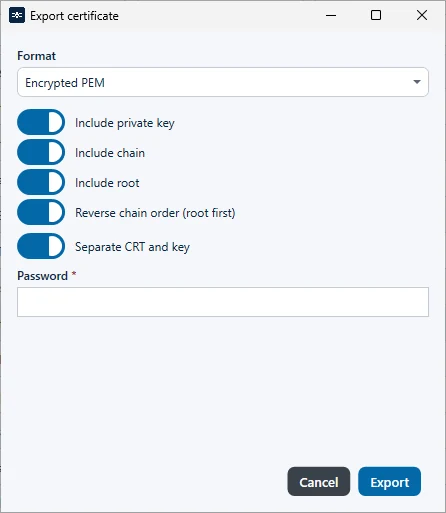
The dialog Export certificate (chapter Export options) and the deployment targets File Path (WinRM), UNC share and File Path (SSH) offer the same four formats and chain options. Separate CRT and key is off by default in the export dialog and on by default in the file deployments; only the deployments offer Also write password file (.pwd):
| Format | Private key | Password |
|---|---|---|
| PKCS #12 (PFX) | Always included; cannot be separated from the certificate. | Protects the whole file. |
| PKCS #8 (PEM) | Unencrypted PKCS #8 (BEGIN PRIVATE KEY). | Not used. |
| PKCS #1 (PEM RSA) | Unencrypted PKCS #1 (BEGIN RSA PRIVATE KEY). RSA keys only. | Not used. |
| Encrypted PEM | Encrypted PKCS #8 (BEGIN ENCRYPTED PRIVATE KEY). The certificate stays unencrypted. | Required if the key is included. |
The options:
- Include private key: adds the key. Without it, TLSPilot writes the certificate only. For PFX, the key is always included.
- Include chain: on by default. On: certificate with the intermediates (full chain). Off: leaf only. Tooltip: Leaf vs full chain in the certificate PEM or PFX bag.
- Include root and Reverse chain order (root first): only available when Include chain is on, see chapter Chain options.
- Separate CRT and key: certificate and key in separate files. Off: one combined PEM file with the certificate first and the key after it. Not available for PFX.
- Password: required for PFX, and for Encrypted PEM when the key is included. In the export dialog, the field is labeled Password *. In the file deployments, it is labeled Password (PFX / Encrypted PEM), with the tooltip Required for Encrypted PEM. Protects the private key only.
File names of an export from the Desktop Admin console:
| Selection | File |
|---|---|
| Without private key | <id>.crt.pem |
| PKCS #12 (PFX) | <id>.pfx |
| PEM, with key, Separate CRT and key on | <id>.zip with <id>-fullchain.pem (or <id>.crt without chain) and <id>.key.pem, <id>.key.rsa.pem or <id>.key.enc.pem |
| PEM, with key, Separate CRT and key off | <id>.bundle.pem with chain, <id>.pem without chain |
TLSPilot exports all formats that its targets use (PKCS #12, PKCS #8, PKCS #1 and Encrypted PEM) directly, so you do not need to convert files with OpenSSL.
The dialog Export certificate offers these formats and options, see Figure Dialog Export certificate with format, chain options and password.