ACME in depth · 18.2
ARI – ACME Renewal Information
ARI (ACME Renewal Information, RFC 9773) lets the CA tell TLSPilot when a certificate should be renewed. The CA publishes a suggested renewal window for each certificate. If the CA has to replace certificates early, for example after a compliance incident, it can move this window forward and so request an early renewal. Let’s Encrypt, Google Trust Services, Sectigo, ZeroSSL and DigiCert ONE offer ARI. At Let’s Encrypt, renewals controlled by ARI are exempt from all rate limits.
How TLSPilot uses ARI:
- Automatic: If the ACME directory of the provider offers ARI (
renewalInfo), TLSPilot uses the renewal window of the CA. TLSPilot detects this for each directory, so ARI also takes effect without an update when a CA adds it later. The Enterprise CA and the Private CA do not use ARI. - Renewal: TLSPilot stores a random time in the first tenth of the window, or of the ARI window, not later than the end of that day, and renews then. It does not deploy. The next cycle deploys. A window that only ends before the next cycle is not renewed early. If the CA pulls the window forward and the emergency switch is on, TLSPilot renews and deploys at once (event 1221). See chapter Keep it renewing.
- Polling: TLSPilot asks the CA after the issue and then as often as the CA requests, but at least once a day and at most once a minute. Without such a request, it asks every 6 hours.
- Replacement: With ARI, the new order tells the CA which certificate it replaces.
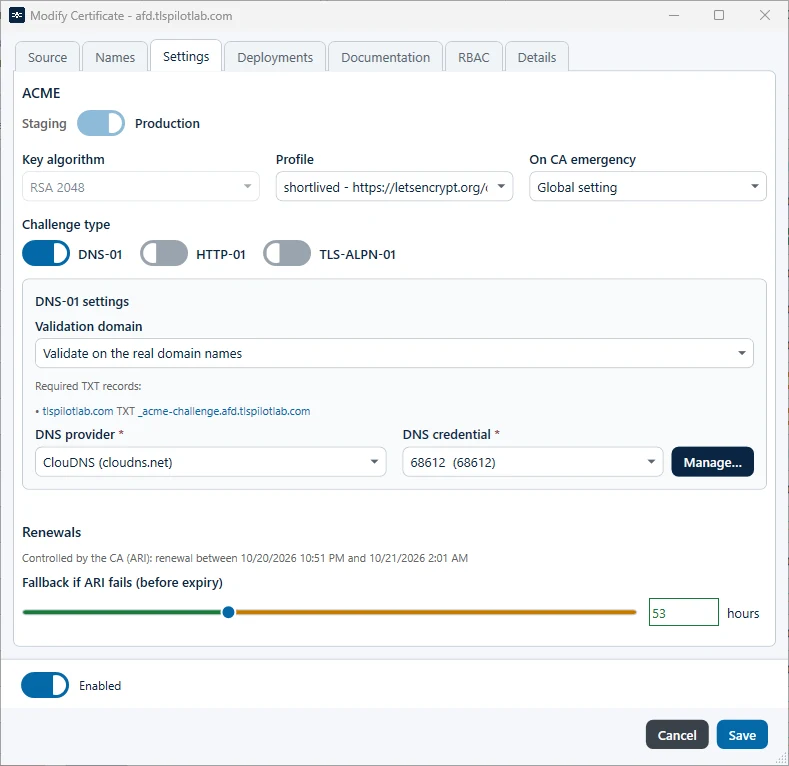
- Display: Status and Next action show the plan (ARI or fallback), the window of the CA and, if the CA provides one, the link to its explanation. The Desktop Admin console, the WebUI and the PowerShell module show the same text.
Emergency option «Renew immediately on CA emergency»
In an emergency, for example after a revocation, the CA pulls the window forward so that the certificate must be renewed at once. For this case, TLSPilot offers the option Renew immediately on CA emergency:
| Where | Setting |
|---|---|
| Globally | In the settings on the tab ACME providers, below DNS-01 propagation wait (seconds, 15-300). Switched off by default. |
| Per certificate | On the tab Settings of an ACME certificate: Global setting (follows the global switch, default), On (always on) or Off (always off). |
| PowerShell | Set-TLSPilotAcmeEmergency |
The option only takes effect if the CA has pulled the window forward. With the switch on, TLSPilot renews and deploys immediately (event 1221). With the switch off, that window is renewed at a random time inside it and deployed at the next cycle.
The renewal window slider as fallback
The renewal window you set with the slider remains active and is labeled as fallback. TLSPilot uses it if the CA does not offer ARI or if ARI fails permanently. If the CA provides renewal information, the line above the slider shows the window of the CA. For ACME, Private CA and Enterprise CA certificates, the maximum of the slider is just under the validity of the current certificate: the validity minus one day, or minus one hour for certificates valid for less than 10 days. At most 30 days or one third of the validity is recommended. For a new certificate, TLSPilot presets the slider from the expected lifetime of the profile and shows Renewal timing is set by the CA (ARI). before the first order; the slider is then labeled Fallback if ARI fails (before expiry). Without a valid ARI window, TLSPilot uses expiry minus the slider value, renews at a random time, and deploys on the next cycle.
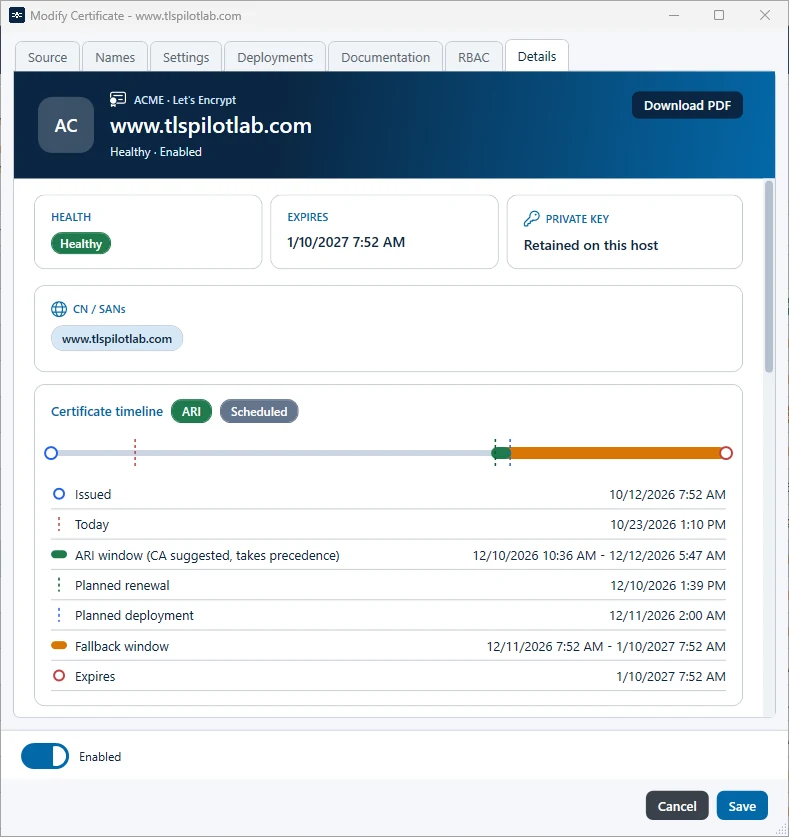
On the tab Details, the Certificate timeline shows the ARI window suggested by the CA, the planned renewal at its stored instant and the fallback window, see Figure Certificate timeline with the ARI window of the CA.