ACME in depth · 18.7
DNS-01 challenge delegation (CNAME alias)
With DNS-01 challenge delegation, the CA validates the names of the certificate through a CNAME record that points into a separate DNS zone, the alias zone. In TLSPilot, this is called DNS-01 Alias Mode. You use it if TLSPilot should not write to the zone of your domains:
- No API rights on the production zone: The team that runs TLSPilot gets no write access to the zone of the company domains, for example because another team or an external provider manages it.
- Security: The DNS credential in TLSPilot only needs access to the alias zone. If it is misused, an attacker cannot change the records of your production zone, for example A or MX records.
- Provider without API: The production zone is hosted at a provider without an API that TLSPilot supports. The alias zone runs at a supported DNS provider.
How it works
A static CNAME record _acme-challenge.<name> in the production zone points to _acme-challenge.<name>.<alias domain> in the alias zone. In this manual, the alias zone is servicedomain.net: a second-level domain of your own, so no alias subdomain is needed. In the figure, it is shown as the service zone. When the CA queries the TXT record _acme-challenge.<name>, it follows the CNAME, which is normal DNS behavior, and reads the TXT record in the alias zone. TLSPilot writes the TXT record in the alias zone only, with the DNS provider and the DNS credential selected in the certificate, and deletes it again after the validation. The production zone is never changed. The CNAME records are created once and stay for all renewals.
Each certificate has one alias domain, and the selected DNS provider and DNS credential apply to it. The alias domain is also the zone at the DNS provider.
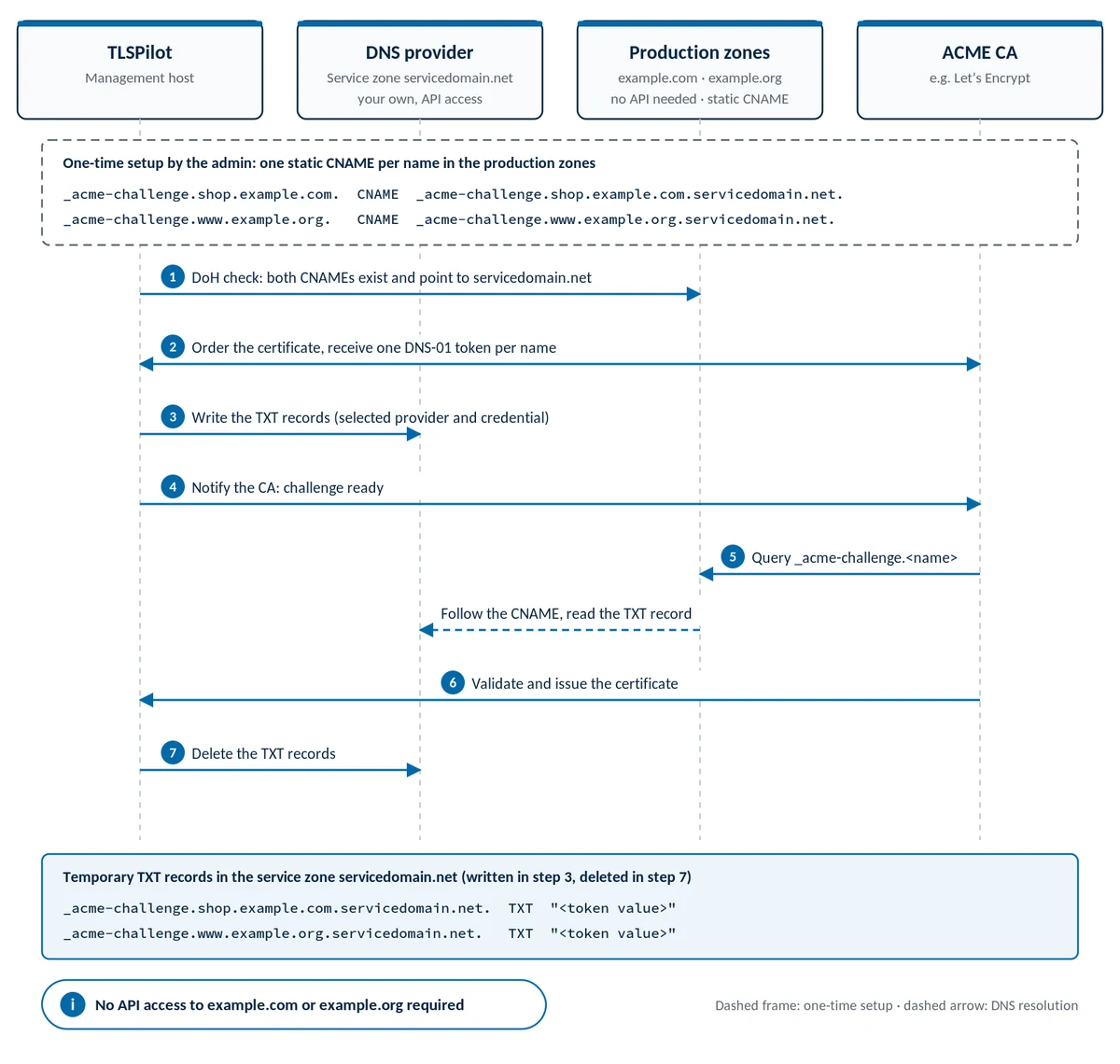
The numbers match the numbered steps in the figure:
- DoH check: both CNAMEs exist and point to servicedomain.net: Before it orders anything, TLSPilot asks the public resolvers of Cloudflare and Google over DNS over HTTPS (DoH) whether
_acme-challenge.shop.example.comand_acme-challenge.www.example.orgexist as CNAME records in the production zones and point toservicedomain.net. If a CNAME record is missing or points elsewhere, if there is more than one CNAME, or if a TXT record exists at the same name, TLSPilot does not start the order and shows which record is affected. If neither resolver answers, TLSPilot logs a warning and continues with the order. - Order the certificate, receive one DNS-01 token per name: TLSPilot orders the certificate for
shop.example.comandwww.example.orgat the ACME CA. The CA returns one DNS-01 challenge with its own token for each of the two names. - Write the TXT records (selected provider and credential): TLSPilot writes the token values as TXT records
_acme-challenge.shop.example.com.servicedomain.netand_acme-challenge.www.example.org.servicedomain.netthrough the API of the DNS provider, with the DNS provider and the DNS credential selected in the certificate. The production zonesexample.comandexample.orgare not changed. - Notify the CA: challenge ready: After the DNS-01 propagation wait, TLSPilot tells the CA that the challenges are ready for validation.
- Query _acme-challenge.<name>: The CA queries the TXT records
_acme-challenge.shop.example.comand_acme-challenge.www.example.orgin DNS. DNS resolution follows the static CNAME records intoservicedomain.net, where the CA reads the TXT records (dashed arrow in the figure). - Validate and issue the certificate: If the TXT values match the tokens of both names, the CA confirms the challenges. TLSPilot sends the CSR, and the CA issues the certificate, which TLSPilot downloads with its chain.
- Delete the TXT records: TLSPilot deletes the two TXT records in
servicedomain.netagain through the DNS provider. The CNAME records in the production zones stay and are used for every renewal.
Example
As in the figure, a certificate with the Common Name shop.example.com and the SAN www.example.org uses the alias domain servicedomain.net. It needs two CNAME records, one per host name. The two names belong to two different production zones, but both CNAME records point to the same alias zone:
| Names in the certificate | CNAME record in the production zone | Points to (alias zone) |
|---|---|---|
| shop.example.com | _acme-challenge.shop.example.com | _acme-challenge.shop.example.com.servicedomain.net |
| www.example.org | _acme-challenge.www.example.org | _acme-challenge.www.example.org.servicedomain.net |
A wildcard name shares its CNAME record with the name without *.: if the certificate also contained example.com and *.example.com, both would share the single CNAME record _acme-challenge.example.com → _acme-challenge.example.com.servicedomain.net.
In zone file notation, the first record reads:
_acme-challenge.shop.example.com.  CNAME
    _acme-challenge.shop.example.com.servicedomain.net.
Notes
- Alias zone of your own: You set up the alias zone yourself at a supported DNS provider. iTrain does not host alias zones.
- DNSSEC: DNSSEC is not required. If it is switched on in the production zone or in the alias zone, the chain over the CNAME and the TXT record must be signed correctly, see chapter CAA records.
- Old TXT records: Remove existing TXT records at
_acme-challenge.<name>in the production zone, for example from an earlier validation. A name with a CNAME record must not have any other records. - Negative caching: If a resolver queried a name before its CNAME record existed, it can keep the negative answer for the negative TTL of the zone. After creating a CNAME record, wait a few minutes before you check it or order the certificate.
- CAA: CAA records apply to the original domain. The CA checks CAA at the names in the certificate and their parent domains, not at the alias zone, see chapter CAA records.
- Edition: DNS-01 Alias Mode is available wherever DNS-01 is available. It needs no separate license.
Setup in TLSPilot: chapter Set up DNS-01 Alias Mode. Errors and solutions: chapter DNS-01.
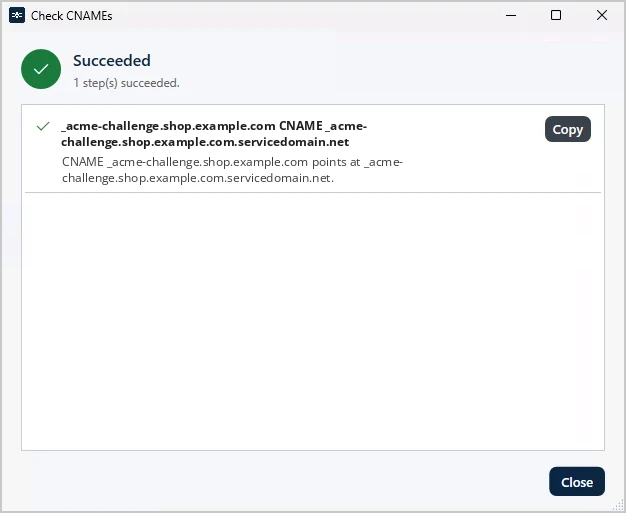
Step 1 of the flow is visible in TLSPilot: Check CNAMEs queries the public resolvers over DoH and lists for every name whether its CNAME record points into the alias zone, see Figure Check CNAMEs confirms the CNAME records of DNS-01 Alias Mode.