
Getting started · 4.3
After the setup
After the wizard, the Desktop Admin console opens with the dashboard, see chapter The TLSPilot Dashboard. The first time, it shows a short welcome with the places you will use every day. Click Got it to close it. It is not shown again on this management host.
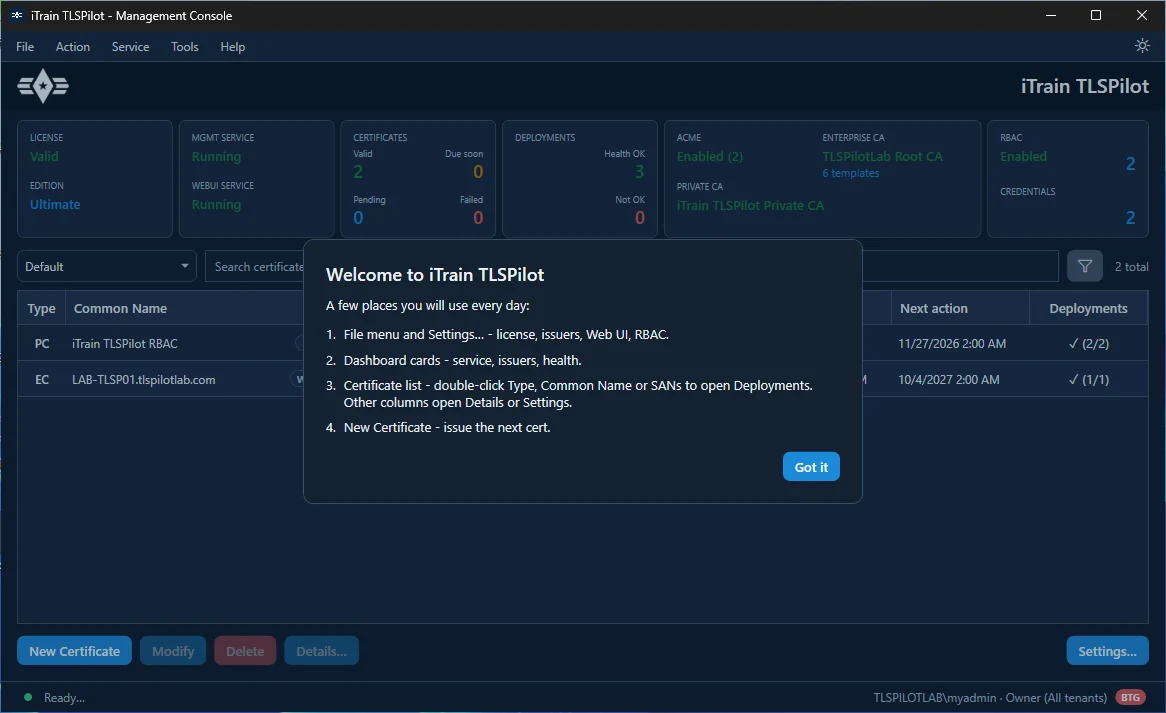
The certificate list only contains the certificates that the wizard has issued for TLSPilot itself. There are no example certificates:
- WebUI certificate: Only if you enabled the WebUI with HTTPS and let the wizard create a new certificate, see chapter WebUI certificate. Its Common Name is the host name (FQDN) of the management host. It has the deployments This host - LocalMachine\My and TLSPilot Web UI HTTPS.
- RBAC certificate: Only if the Entra ID helper created the app registration, see chapter Entra ID helper. Its Common Name is iTrain TLSPilot RBAC by default. It has the deployments This host - LocalMachine\My and Entra ID app certificate.
If neither applies, for example because you did not enable the WebUI or clicked Later in the Entra ID helper, the certificate list is empty and shows 0 total. Continue with chapter My First Certificates.
To give further people access to TLSPilot, assign them a role in the RBAC Manager, see chapter Assign roles.