Appendix: WinRM and SSH setup · 20.3
SSH for Linux targets
For Nginx, Apache, HAProxy and Tomcat, the SSH user writes the certificates only through least-privilege wrappers. The helper script of the tab Helper installs them for each deployment. For PostgreSQL, MySQL and Linux File Path, the helper script writes the file /etc/sudoers.d/tlspilot-<service> instead. It allows mkdir, install, rm, stat, chown, systemctl and the reload tools of the service as root, without restricting their arguments. This is not unrestricted sudo, but it is close to root; use these targets only on hosts where this is acceptable. For these targets, the script also creates the SSH user if it does not exist, adds it to the group ssl-cert and to the group of the files, and does not run the final sudo -l check.
- Create a dedicated service user without an interactive password, for example
sudo useradd -m -s /bin/bash tlspilot. Best practice: one user per purpose, never root. The helper script for Nginx, Apache, HAProxy and Tomcat does not create this user and stops if it does not exist. - Use key login. Create the key pair, store the private key in PEM format in the credential of the type Linux SSH, and add the public key to
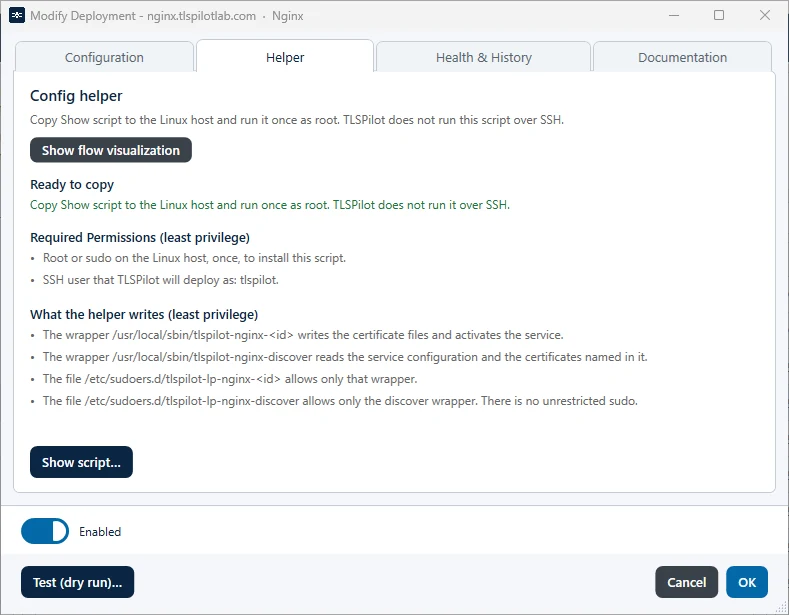
~tlspilot/.ssh/authorized_keys(permissions 700 for.ssh, 600 for the file). - In the deployment, open the tab Helper. Show flow visualization shows what happens during the setup, the first deployment and every renewal. Click Show script…, copy the script to the Linux host and run it once as root. TLSPilot does not run this script over SSH. Each deployment has its own script, so run the script of each deployment once. The script is safe to re-run. If the dry run reports Paths changed, run the script again.
- For Nginx, Apache, HAProxy and Tomcat, the script writes the following, where
<service>isnginx,apache,haproxyortomcatand<id>identifies the deployment:/usr/local/sbin/tlspilot-<service>-<id>: the wrapper that writes the certificate files and activates the service./usr/local/sbin/tlspilot-<service>-discover: the discover wrapper that reads the service configuration and the certificates named in it, for the tab Discovery./etc/sudoers.d/tlspilot-lp-<service>-<id>allows only that wrapper, and/etc/sudoers.d/tlspilot-lp-<service>-discoverallows only the discover wrapper. Each file is checked withvisudoand rolled back if the check fails.- At the end, the script checks with
sudo -lthat the SSH user may run only wrapper actions. If the user has further sudo rules, for example in/etc/sudoersor through a group rule, or is a member of the groupsudo,wheeloradmin, the script stops with an error. Remove these rights and run it again.
- In the tab Configuration, switch on Least-privilege wrapper is installed once the script has run. If the toggle is off, TLSPilot deploys directly without the wrapper. This works with root or full sudo rights, but on a hardened host, where the SSH user may write only through the wrapper, the deployment fails. If the toggle is on and the wrapper is not installed on the host, the deployment stops with the error The wrapper … is not installed or not allowed for <user>. Run the helper script as root on the host.
- Two optional toggles in the tab Configuration extend the script. Both are off by default:
- Remove existing sudoers rights and group memberships: The script moves older TLSPilot files in
/etc/sudoers.d/to a backup folder under/var/lib/tlspilot/and removes the SSH user from groups such asssl-cert,nginx,www-data,haproxyortomcat. The sudoers filestlspilot-lp-*of the wrappers are kept. If sudoers files of PostgreSQL, MySQL or Linux File Path targets exist on the host, the script stops, as these targets use their own sudoers file instead of a wrapper. - Make the SSH account key-only: The script restricts the SSH user to key login in the SSH server configuration: no password, no forwarding and no terminal. It checks the configuration with
sshd -t, rolls back on an error and reloads the SSH service. This works only with a key credential. With a password credential, the helper leaves password login enabled: This credential is not a key. The helper leaves password login enabled.
- Remove existing sudoers rights and group memberships: The script moves older TLSPilot files in
- Allow TCP 22, or your SSH port, from the management host only.
- Run Test (dry run)….
The tab Helper of a Linux deployment shows the required permissions and what the helper script writes, see Figure Tab Helper of an Nginx deployment with the least-privilege wrapper.