Appendix: WinRM and SSH setup · 20.1
WinRM within the domain
For every WinRM connection, TLSPilot prefers HTTPS on port 5986 with full validation of the listener certificate: the chain must end at a root certificate trusted on the management host, and the certificate must be issued for the host name entered in the deployment. If port 5986 refuses the connection or does not answer, or if the certificate validation or the TLS handshake fails, TLSPilot uses HTTP on port 5985 with Negotiate (Kerberos or NTLM) message encryption. Basic authentication and unencrypted WinRM are never used. A failed sign-in over HTTPS does not fall back to HTTP.
TLSPilot remembers the result for each target host. Every run that you start yourself, that is Deploy…, a Health check or Test (dry run)…, in the Desktop Admin console or in the WebUI, checks HTTPS on port 5986 again and updates the remembered result. A newly configured HTTPS listener is therefore used with the next run you start. The daily cycle uses the remembered result; the transport line then shows when it was checked, for example WinRM over HTTPS (5986) (checked 07:02).
The deploy log, the result of the deployment, the dry run and the tab Health & History show the transport used on a line of its own, for every Windows deployment type: WinRM over HTTPS (5986) or WinRM over HTTP (5985), after a fallback with the reason, for example HTTPS on 5986 not used: connection refused., timed out., certificate not trusted., certificate name does not match <host>. or TLS handshake failed. The Desktop Admin console, the WebUI and the PDF report show the same information. Exchange deployments are not part of this: TLSPilot connects to the Exchange endpoint http://<server FQDN>/PowerShell/ with Kerberos, see chapter Exchange.
If the management host and the target are members of the same Active Directory domain or of trusting domains, a target without an HTTPS listener is reached with Kerberos over HTTP (port 5985). The traffic is encrypted by Kerberos.
- On the target, enable WinRM in an elevated PowerShell:
Enable-PSRemoting -Force. On Windows Server, WinRM is usually already enabled. - Allow TCP 5985 from the management host in the Windows firewall of the target. Best practice: Use a group policy for both steps.
- Create a dedicated service account, or a group managed service account, see chapter Use managed service accounts, and add it to the local group Administrators of the target only. Do not use a domain administrator.
- Enter the target host as FQDN, for example
web01.example.com, as Kerberos needs the name of the computer account. IP addresses fall back to NTLM and fail in most configurations. - Test the connection from the management host:
Test-WSMan web01.example.com -Authentication Kerberos, then run Test (dry run)… in the deployment.
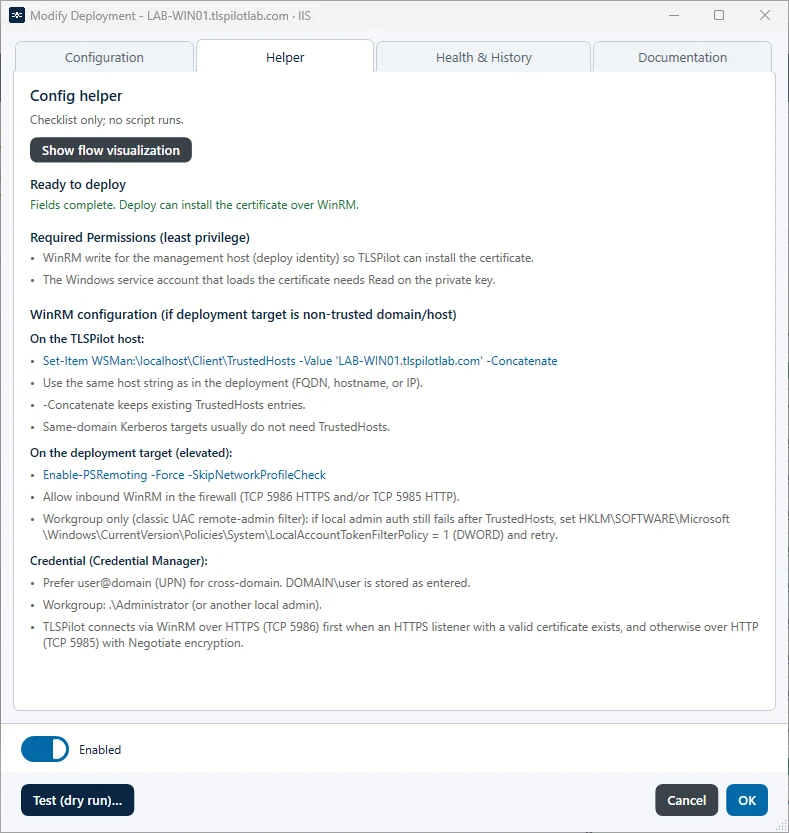
The tab Helper of a Windows deployment lists the required permissions and the WinRM configuration for this target, on the management host and on the target, and states that TLSPilot connects over HTTPS (TCP 5986) first and otherwise over HTTP (TCP 5985) with Negotiate encryption, see Figure Tab Helper of a Windows deployment with the WinRM configuration.