
My first deployments · 6.5
Exchange
This example enables a certificate on an Exchange server for IIS (Outlook on the web, ActiveSync, Autodiscover) and SMTP, and optionally pins it on Send Connectors. TLSPilot uses the Exchange Management Shell; the target must be an Exchange server with the Exchange Management Shell, typically a Mailbox server.
Connection and permissions: For a remote Exchange server, TLSPilot opens a remote PowerShell session to the Exchange endpoint http://<server FQDN>/PowerShell/ with Kerberos, the same way as the Exchange Management Shell. Enter the target host as fully qualified domain name, as a short name fails with Kerberos. The account needs an Exchange RBAC role that allows the certificate cmdlets, for example via the role group Organization Management, or a custom role group with the role Exchange Server Certificates (least privilege), plus local administrator rights for the import. On the Exchange server itself, select Localhost.
- Open the tab Deployments of the certificate as described in chapter Local store and click Add…
- Linked service: Select Exchange.
- Target host and Credential: Enter the FQDN of the Exchange server and select the credential.
- Open the tab Discovery. Under Enable for services, TLSPilot lists IIS (OWA, ECP, EWS, ActiveSync, …) and SMTP (receive connectors / transport), and under Send Connectors the Send Connectors of the organization, each with the certificate currently on the target and its badge.
- Enable for services: In the section Exchange Server, TLSPilot presets the toggles IIS and SMTP of a new deployment from the result: switched on if the service already uses this certificate, otherwise off. When you open a saved deployment, your saved toggles are kept. A hint next to each toggle shows the current state. Switch on the services that should use this certificate. If a toggle changes, Save becomes active.
- Send connectors (optional): Send Connectors that already use this certificate are switched on automatically. Switch on further connectors, or enter their identities separated by commas or one per line. TLSPilot sets the certificate as
TlsCertificateNameon these Send Connectors only. Leave the list empty to change no Send Connector. This is independent of SMTP receive above: with SMTP, TLSPilot sets the certificate asTlsCertificateNameon the receive connectors Default Frontend and Client Frontend of this server; if neither exists, the deployment fails.
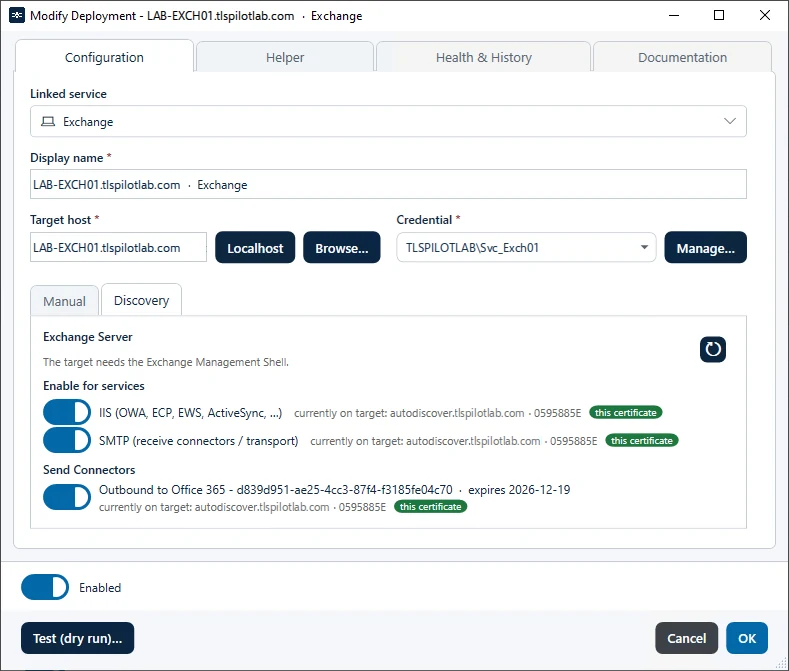
- Click Test (dry run)…, then OK and Save, and confirm the deployment with Yes.
TLSPilot imports the certificate and runs Enable-ExchangeCertificate for the selected services. When SMTP is enabled, Exchange does not ask whether to overwrite the default SMTP certificate. The Health check verifies that the services use the new thumbprint.