
Knowledge Base · Category 6
My first deployments
This chapter guides you through deploying certificates to their targets, using six typical examples. Depending on your edition, TLSPilot supports further targets, for example the TLSPilot WebUI, Remote Desktop Services, Exchange, application delivery controllers, firewalls and VPNs, Google Cloud and Amazon Web Services, see chapter Optional features.
Chapter overview
| Target | Description | Connection | Required (besides Display name) | Editions |
|---|---|---|---|---|
| Windows | ||||
| Web UI HTTPS | Binds the certificate to the HTTPS listener of the TLSPilot WebUI on the management host. Set up in the settings on the tab WebUI, not under Linked service. | Local | No further fields | From Standard |
| Certificate store only see chapter Local store | Imports the certificate into the certificate store LocalMachine\My of a Windows server, without binding it to a service. | Local or WinRM | Target host Credential Windows WinRM (remote host only) | All editions |
| IIS see chapter IIS | Imports the certificate and binds it to the HTTPS binding of an IIS site. | Local or WinRM | Target host, IIS site name Credential Windows WinRM (remote host only) | All editions |
| Remote Desktop Services (RDS) | Binds the certificate to RDS roles, for example RD Gateway or RD Web Access. | Local or WinRM | Target host Credential Windows WinRM (remote host only) | From Standard |
| Exchange | Imports the certificate on an Exchange server and enables it for services such as IIS and SMTP. | Local or WinRM | Target host Credential Windows WinRM (remote host only) | From Standard |
| AD FS see chapter AD FS | Uses the certificate as SSL or service communications certificate of AD FS, or both. | Local or WinRM | Target host Credential Windows WinRM (remote host only) | From Standard |
| SQL Server | Sets the certificate for TLS of a SQL Server instance and restarts the instance. | Local or WinRM | Target host Credential Windows WinRM (remote host only) | From Standard |
| NPS (RADIUS) | Binds the certificate to PEAP or EAP network policies of NPS. | Local or WinRM | Target host Credential Windows WinRM (remote host only) | From Standard |
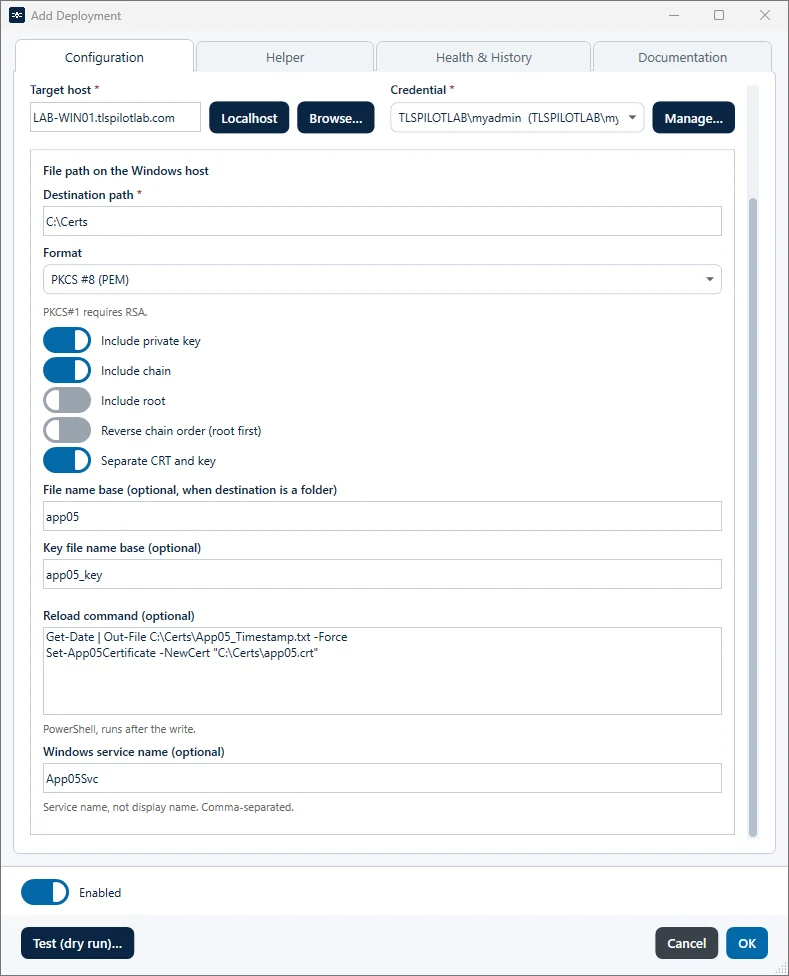
| File Path (WinRM) see chapter Chain options | Writes the certificate as PFX or PEM files to a folder on a Windows server, with the chain options Include chain, Include root and Reverse chain order. | Local or WinRM | Target host, Destination path Credential Windows WinRM (remote host only) | All editions |
| UNC share see chapter Chain options | Writes the certificate as PFX or PEM files to a network share, with the same chain options. | UNC path (SMB) | UNC path Credential Windows WinRM or Custom / other | All editions |
| Linux | ||||
| Nginx see chapter Nginx | Writes the certificate and the key and reloads Nginx. | SSH | Target host Credential Linux SSH | From Professional |
| Apache | Writes the certificate and the key and reloads Apache. | SSH | Target host Credential Linux SSH | From Professional |
| HAProxy | Writes a combined PEM file and reloads HAProxy. | SSH | Target host Credential Linux SSH | From Professional |
| Tomcat | Writes a PKCS #12 keystore for the Tomcat connector. | SSH | Target host Credential Linux SSH Keystore password | From Professional |
| PostgreSQL | Writes the certificate and the key and reloads PostgreSQL. | SSH | Target host Credential Linux SSH | From Professional |
| MySQL/MariaDB | Writes the certificate and the key and reloads the TLS configuration of the server. | SSH | Target host Credential Linux SSH | From Professional |
| File Path (SSH) see chapter Chain options | Writes the certificate and the key as PEM or PFX files to a Linux server, with the same chain options. | SSH | Target host Credential Linux SSH | From Professional |
| Appliances | ||||
| F5 BIG-IP | Imports the certificate and the key and updates the client SSL profile. | API (iControl REST) | Management host, SSL profile / cert name Credential F5 BIG-IP | From Professional |
| Palo Alto PAN-OS | Imports the certificate on a PAN-OS firewall, for example for GlobalProtect. | API (PAN-OS XML API) | Management host, Certificate name Credential Palo Alto PAN-OS | From Professional |
| Palo Alto Strata Cloud Manager | Imports the certificate into Strata Cloud Manager. | Cloud (Strata Cloud Manager) | TSG ID, Folder, Certificate name Credential Palo Alto Strata Cloud Manager | From Professional |
| UAG (Omnissa) | Replaces the TLS certificate of an Omnissa Unified Access Gateway. | API (UAG Admin REST API) | UAG management host Credential Omnissa UAG | From Professional |
| Cloud | ||||
| Azure Key Vault see chapter Azure Key Vault | Stores the certificate in Azure Key Vault as certificate or as secret. | Cloud (Azure) | Tenant ID, Subscription ID, Resource group, Key Vault name, Object name Credential Azure / Entra app | From Enterprise |
| Azure App Service | Uploads the certificate to an App Service and can bind host names (SNI). | Cloud (Azure) | Tenant ID, Subscription ID, Resource group, App Service name Credential Azure / Entra app | From Enterprise |
| Azure Front Door | Binds a Key Vault certificate to a custom domain of Front Door Standard or Premium. | Cloud (Azure) | Tenant ID, Subscription ID, Resource group, Front Door profile name, Custom domain, Key Vault name Credential Azure / Entra app | From Enterprise |
| Azure Application Gateway | Updates an SSL certificate of an Application Gateway, directly or as reference to Key Vault. | Cloud (Azure) | Tenant ID, Subscription ID, Resource group, Application Gateway name, SSL certificate object name; Key Vault name if the certificate is also stored in Key Vault Credential Azure / Entra app with Network Contributor on the gateway, its resource group and the gateway subnet; in Key Vault mode also Key Vault Certificates Officer on the vault and Managed Identity Operator (assigned by the helper). Reader is enough for Discovery only. | From Enterprise |
| Azure API Management | Binds the certificate to a custom domain of API Management (Consumption). | Cloud (Azure) | Tenant ID, Subscription ID, Resource group, API Management service name, Custom hostname Credential Azure / Entra app | From Enterprise |
| Entra application proxy | Replaces the TLS certificate of the custom domain of Entra application proxy apps. | Cloud (Microsoft Graph) | Tenant ID, Application ID Credential Azure / Entra app | From Enterprise |
| Entra app registration see chapter App registration | Adds the certificate as credential to an Entra app registration. | Cloud (Microsoft Graph) | Tenant ID, Application (client) ID | From Enterprise |
| Google Cloud Certificate Manager | Uploads the certificate as self-managed certificate into Certificate Manager. | Cloud (Google Cloud) | Project ID, Certificate name Credential Google Cloud | From Professional |
| AWS Certificate Manager (import) | Imports the certificate into AWS Certificate Manager, or reimports it on renewal. | Cloud (AWS) | Certificate name Credential AWS | From Professional |
| Custom | ||||
| Custom Deployment see chapter Custom Deployment | Runs your own PowerShell script on the management host, for targets without a native deployment. | PowerShell script | Deployment Script | From Enterprise |
Tomcat
The target Tomcat writes a PKCS #12 keystore for the Tomcat connector. The field Keystore password is required: Tomcat uses it as certificateKeystorePassword in server.xml, and TLSPilot protects the keystore only with this password. Without it, the deployment stops with A PFX password is required.; a Tomcat deployment without a keystore password fails until a password is set. After writing, TLSPilot reloads Tomcat with systemctl reload tomcat10, then systemctl restart tomcat10, and as fallback the same for the service tomcat, unless you enter a custom reload command.
The following sections show a selection of typical targets in detail.
Articles in this category
- 6.1Tutorial 09
Local store
This example deploys a certificate to the certificate store LocalMachine\My of a remote Windows server.
- 6.2Tutorial 10
IIS
This example binds a certificate to a website on a remote IIS server. IIS deployments cover a great many scenarios, as many applications run on IIS.
- 6.3
Tabs Manual and Discovery
For Windows and Linux targets, the deployment dialog has two tabs below Target host and Credential: Manual and Discovery.
- 6.4
NPS (RADIUS)
This example binds a certificate to the PEAP or EAP network policies of a Network Policy Server (NPS), for example for WLAN, VPN or 802.1X switch authentication.
- 6.5
Exchange
This example enables a certificate on an Exchange server for IIS (Outlook on the web, ActiveSync, Autodiscover) and SMTP, and optionally pins it on Send Connectors.
- 6.6
AD FS
This example deploys a certificate to an AD FS federation server. TLSPilot uses it as SSL certificate, as service communications certificate, or both.
- 6.7Tutorial 11
Nginx
This example deploys a certificate to an Nginx server on Linux. Apache and other Linux services are configured the same way.
- 6.8Tutorial 12
App registration
This example protects an Entra app registration with a certificate instead of a client secret.
- 6.9Tutorial 13
Azure Key Vault
This example stores a certificate in an existing Azure Key Vault, as an example of the Azure deployment types.
- 6.10Tutorial 14
Custom Deployment
From the Enterprise edition, you can deploy certificates to targets that TLSPilot does not support natively, using your own PowerShell scripts, which can also call other tools, for example to connect to a Linux server via SSH.