My first deployments · 6.6
AD FS
This example deploys a certificate to an AD FS federation server. TLSPilot uses it as SSL certificate, as service communications certificate, or both. Token-signing and token-decrypting certificates are not changed, as this would affect the federation trusts. Use a Custom Deployment if you need to rotate them, see chapter Custom Deployment.
- Open the tab Deployments of the certificate as described in chapter Local store and click Add…
- Linked service: Select AD FS.
- Target host and Credential: Enter the federation server, or click Localhost if TLSPilot runs on it. For a remote server, select a WinRM credential.
- Certificate binding: Keep SSL + Service communications (recommended), or choose SSL only (Set-AdfsSslCertificate) or Service communications only. The CN or a SAN of the certificate must cover the federation service name (
Get-AdfsPropertiesHostName). - Restart AD FS service (adfssrv) after update: Keep it on, so that AD FS uses the new certificate right away.
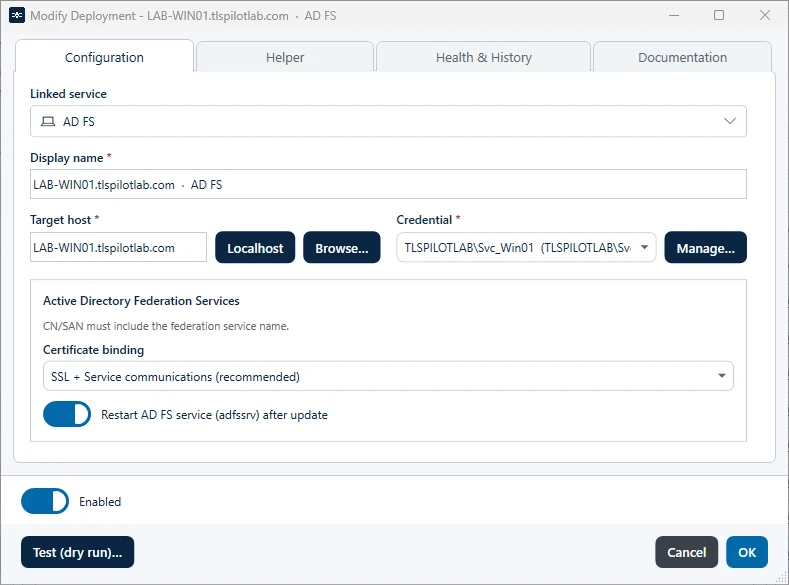
- Click Test (dry run)…, then OK and Save, and confirm the deployment with Yes.
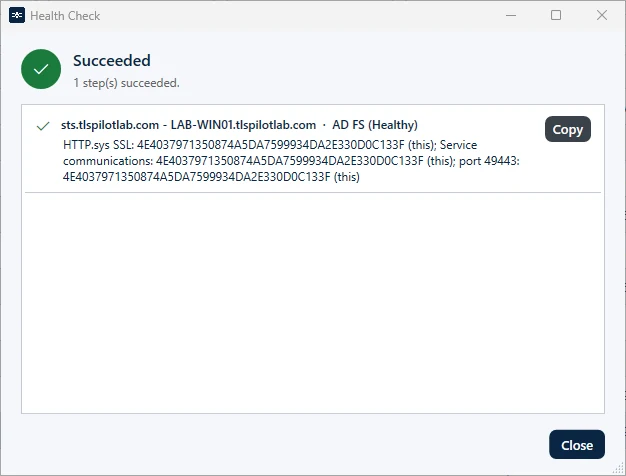
TLSPilot imports the certificate into LocalMachine\My and grants the AD FS service account read access to the private key. Before binding, it checks that the certificate covers the federation service name; if not, the deployment stops without changes to AD FS. For SSL, TLSPilot uses Set-AdfsSslCertificate locally. Over WinRM, it binds the certificate directly in HTTP.sys for the federation service name on the ports 443 and 49443, as Set-AdfsSslCertificate does not work in a remote session. For service communications, it runs Set-AdfsCertificate. It then restarts adfssrv if selected, and the Health check verifies the SSL binding in HTTP.sys, the service communications certificate and the binding on port 49443.