
External credential stores · 11.3
Use managed service accounts
Instead of a user account with a password, you can use a group managed or delegated managed service account for Windows targets, which is the better choice in most cases. Its password is managed by Active Directory and changed regularly.
- Click the tile Credentials on the dashboard to open the Credentials Manager, and click Add…
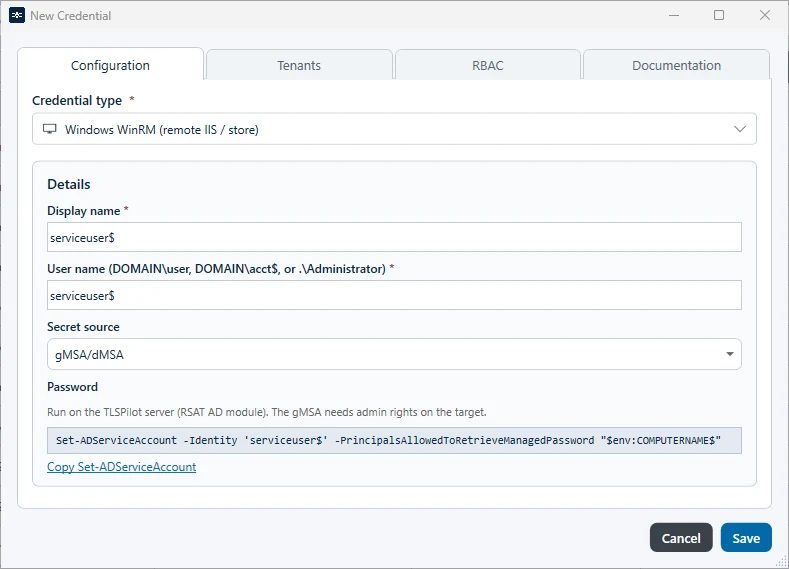
- Select the type Windows WinRM (remote IIS / store) and enter a Display name and the User name of the account in the format DOMAIN\acct$ or as UPN. The account name must match the account in the Set-ADServiceAccount command in the next step, for example “gmsaiisman01$”.
- Secret source: Select gMSA/dMSA. TLSPilot shows a PowerShell command that allows the management host to retrieve the password of the account, for example:
Set-ADServiceAccount -Identity 'gmsaiisman01$' -PrincipalsAllowedToRetrieveManagedPassword "$env:COMPUTERNAME$"
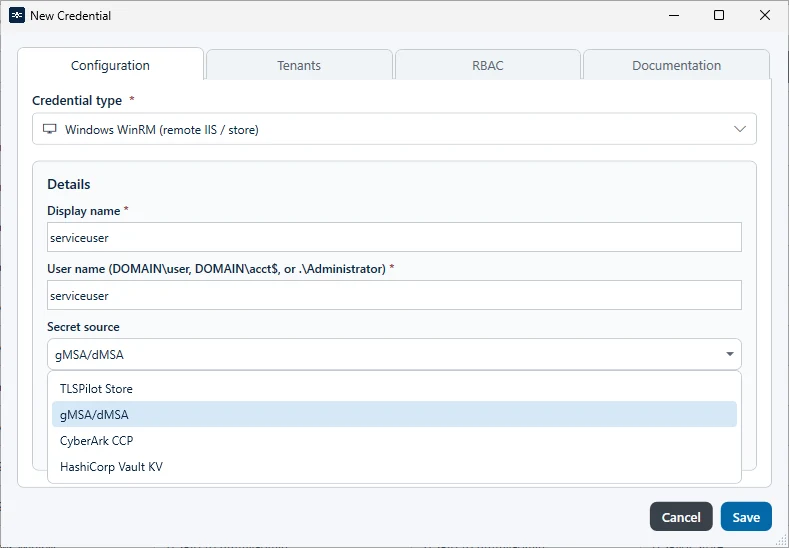
- Click the link Copy Set-ADServiceAccount, run the command in Windows PowerShell on the
management host and click Save. The Active Directory module for PowerShell (RSAT) must be installed.
Select the credential in the deployment. The account must have the required permissions on the target,
for example membership in the local Administrators group for a deployment of the type Certificate store only. The tab Helper of the deployment shows the minimum permissions.