
My first deployments · 6.2
IIS
On this page
Tutorial 10: IIS · 2:52Open on the Tutorials page
This example binds a certificate to a website on a remote IIS server. IIS deployments cover a great many scenarios, as many applications run on IIS. The management host must reach the server via WinRM, see chapter Network connectivity.
- Open the tab Deployments of the certificate as described in chapter Local store, switch on Automatic deployment if it is not yet on, and click Add…
- Linked service: Select IIS.
- Target host: Click Browse… and select the server, for example “IIS01”.
- Credential: Existing credentials are preselected, but you can select a different one. If none exists yet, create one as described in chapter Local store.
- Tab Discovery: Open the tab Discovery. TLSPilot reads the websites of the server and lists each HTTPS binding with its port, the SNI host name if there is one, the expiry date and the certificate currently bound, see chapter Tabs Manual and Discovery. Switch on the binding to which the certificate should be bound. A website without an HTTPS binding shows Binding is created on deploy.
- HTTPS port (optional) and SNI Hostname: TLSPilot fills in both fields from the selected binding. Check them. Leave HTTPS port (optional) empty to use port 443. If you know the site name and do not need the list, enter it in the tab Manual instead. The website must already exist and be started.
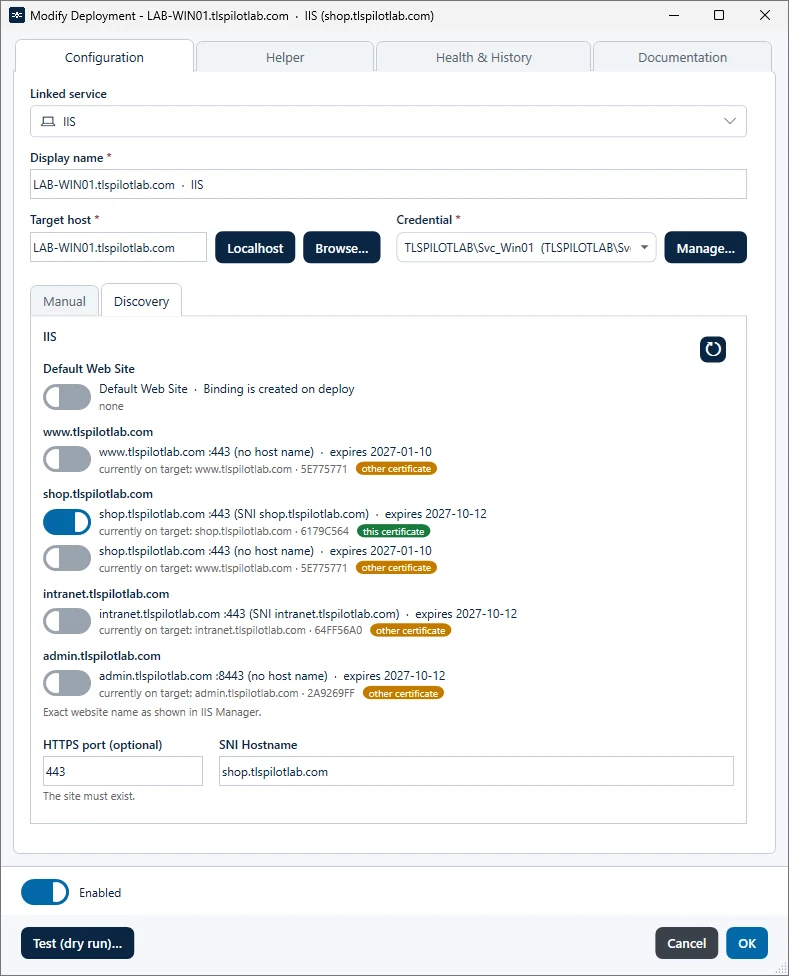
- Click Test (dry run)… If the website does not yet have an HTTPS binding on this port, the dry run reports it. This is not an error, as the deployment creates the binding.
- Helper (optional): As in chapter Local store, the tab Helper shows how the deployment works and what else you can configure.
- Click OK and then Save. When asked whether to deploy now, click Yes.
TLSPilot binds the certificate to the HTTPS binding of the website on the specified port and creates the binding if it does not exist yet. It then checks the Health, that is, whether the certificate is actually bound. Click Close once the deployment has finished.